
The profile looks great. Warm smile, decent lighting, a few travel shots, a dog. The messages are attentive and funny. Three weeks in, there’s a family emergency and a request for money, and the person in those photos has never existed.
Romance and confidence fraud cost Americans $929.3 million in 2025 according to the FBI’s Internet Crime Complaint Center, up from $672 million the year before. Fake faces are part of why those scams work so well. In a widely cited PNAS study by Sophie Nightingale and Hany Farid, people distinguished real faces from AI-generated ones with 48% accuracy, slightly worse than a coin flip. Worse, they rated the synthetic faces as 7.7% more trustworthy than real ones.
So the face that makes you feel safe might be the most dangerous thing on the profile. Here’s how to check it properly.
Why Fake Faces Became the Scammer’s Favorite Tool
A few years ago, scammers stole photos of real people, usually attractive soldiers, doctors, or engineers, from public social accounts. That approach had a weakness. A reverse image search often turned up the real owner.
AI-generated faces close that gap. Each one is new, so there’s no original to find. A scammer can create a consistent “person” across dozens of photos, in different outfits and locations, without anyone’s real Instagram to trip over. The newest image models will happily produce a casual selfie, a gym mirror shot, or a blurry holiday photo that looks exactly like what normal people post.
Running a Photo Through a Detector
Because reverse search alone no longer catches these, a dedicated check is now the sensible first move. Phrasly’s free AI Image Detector is built for exactly this kind of quick screening. Save or screenshot the profile photo, drop it in, and you’ll get a verdict of AI, real, or partly AI-edited along with a confidence score. It’s free with no account needed, and the page says uploaded images aren’t stored.
Two features matter for profile checks in particular. First, the heatmap shows which parts of the image look generated, which helps when someone has pasted a real face onto an AI body or background, or vice versa. Second, it handles face swaps and AI retouching in still images, not just fully synthetic pictures.
Test more than one photo. Scammers often mix a few stolen real images with AI-generated ones, so a single “real” result doesn’t clear the whole profile.
It also helps to know what an instant “certain” verdict means. Images from Google’s tools carry an invisible SynthID watermark, and OpenAI adds SynthID and C2PA credentials to ChatGPT images, as Phrasly’s guide to AI watermarks in ChatGPT, Claude and Gemini explains. If the detector finds one, the question is settled. If it doesn’t, the pixel model’s confidence score is your guide, because many scammers use open-source tools that add no watermark at all.
The Scale of the Problem Right Now
The numbers explain why it’s worth the extra minute.
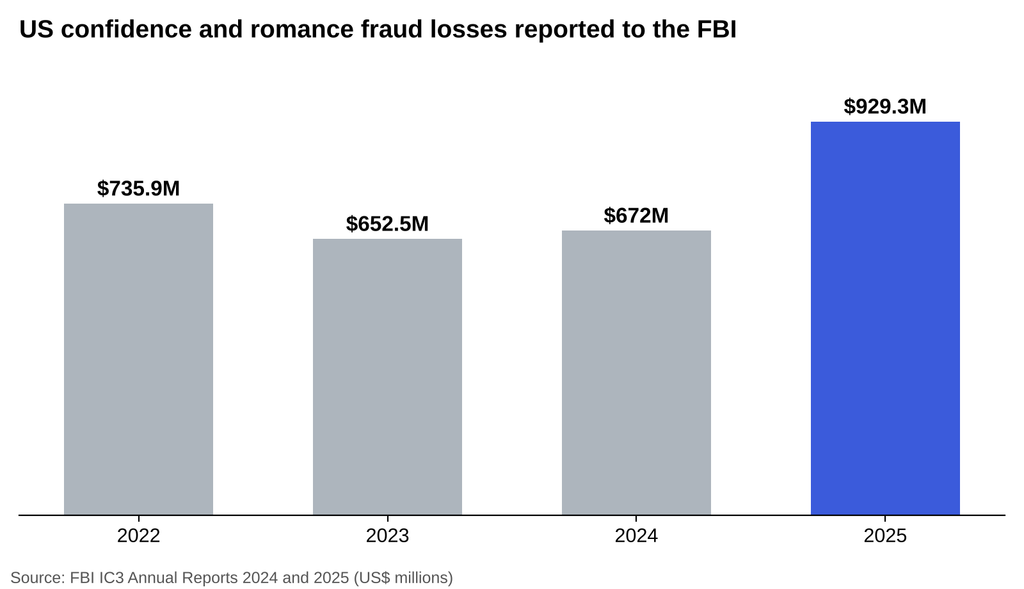
Annual losses to confidence and romance fraud reported to the FBI, in US dollars. Source: FBI IC3 Annual Reports, 2024 and 2025.
That 2025 jump to $929.3 million came from 23,159 complaints, and those are only the people who reported. The same FBI report counted 626 confidence and romance complaints in 2025 that specifically mentioned AI, with just over $19 million lost.
Where do these scams start? The FTC said in April 2026 that nearly 60% of people who reported losing money to a romance scam in 2025 said it began on a social media platform. Dating apps aren’t the only hunting ground. Facebook friend requests, Instagram DMs, and even LinkedIn messages are common entry points.
And people are noticing the fakes. In a McAfee survey of 7,000 adults across seven countries, released in February 2026, 35% said they’d spotted AI-generated or modified photos on dating or social apps, and one in four Americans said they’d encountered a fake profile or AI-generated bot.
Platforms are fighting it, at enormous scale
LinkedIn’s community report for July to December 2025 shows 88.9 million fake accounts stopped at registration and 24.4 million more restricted before any member reported them. Meta said it disrupted nearly 12 million accounts linked to scam centers across Facebook, Instagram, and WhatsApp in the first half of 2025 alone. Those are huge numbers, and plenty still slip through.
A Practical Check You Can Run on Any Profile
Use the detector, then add these steps. Each one catches something the others might miss.
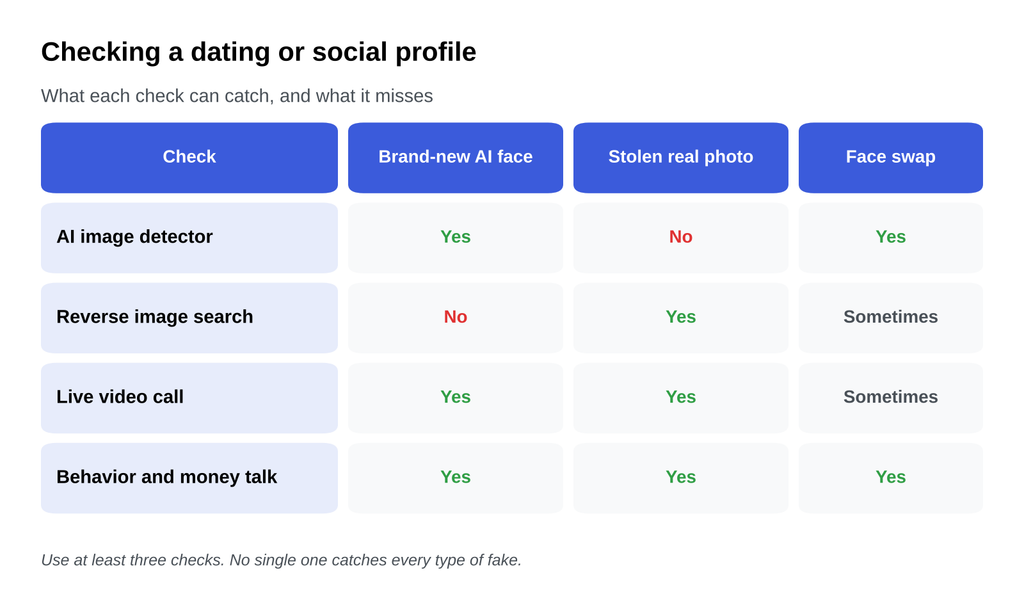
What each profile check can and cannot catch. Layering them closes the gaps.
Look at the Photos as a Set
Real people’s photo collections are messy. Different phones, lighting, ages, haircuts, and friends who appear more than once. AI-built profiles often look strangely uniform: the same flattering angle, the same perfect skin, backgrounds that are pretty but generic. If every shot looks like a stock photo of a “successful professional,” be wary.
Zoom In on the Details
Check earrings, glasses, collars, and hairlines, where AI images often blend things that shouldn’t merge. Look at teeth and ears. Read any text in the background, since garbled signs and labels remain a common tell. Check whether the background people look oddly smeared or duplicated.
Reverse Search Anyway
It won’t catch a brand-new AI face, but it still catches stolen photos, which remain extremely common. Use Google Lens or TinEye. If the same face shows up under a different name, you have your answer.
Ask for Something a Generator Can’t Fake Easily
A live, unscheduled video call is still one of the strongest tests. Ask casually, and notice the reaction. Excuses that never end, a camera that’s always “broken,” or a call that only ever happens at a moment the other person picks are all warning signs. Some scammers now use real-time deepfake video, so watch for faces that glitch when a hand passes in front, or lips that drift out of sync.
The behavior test matters more than the photo test
Even a perfect photo can’t hide the script. Watch for fast declarations of love, reasons they can’t meet, pressure to move to a private messaging app, and any mention of money, crypto, investments, gift cards, or customs fees. If those appear, the photos don’t really matter anymore.
Red Flags at a Glance
| What you see | Why it matters |
| Every photo flawless, same angle, same lighting | AI-built sets tend to be uniform |
| Reverse search shows the face under another name | Stolen photo, classic catfish |
| Detector flags AI or shows edited regions | Synthetic or manipulated image |
| Won’t video call, or video looks glitchy | Hiding a fake identity |
| Quick intimacy, then money or crypto talk | Standard romance scam script |
| Pushes you off the app to private chat | Avoiding platform safety tools |
If You Think You’ve Found a Fake
Don’t confront them in a way that tips them off while you’re still deciding. Stop sharing personal details, and never send money, codes, or ID documents. Report the profile to the platform, since that’s how fake accounts get taken down for others too. If you’ve lost money, report it to your bank right away and to the FBI’s IC3 or the FTC in the US, or your local equivalent elsewhere.
And if a friend or parent is the one talking to the suspicious profile, run the check for them. People who are emotionally invested are the least likely to question the photos.
Verify the Face, Then Watch the Behavior
AI has removed the old shortcut. A friendly face is no longer evidence that a person exists, and research shows synthetic faces can feel even more trustworthy than real ones. That’s exactly why scammers love them.
The fix isn’t paranoia, it’s a habit. Run profile photos through a detector, look at the full set with a critical eye, reverse search anyway, and push for a live video call. Then pay attention to behavior, because the script gives scammers away even when the pictures don’t. A couple of minutes of checking costs nothing. Skipping it, as nearly a billion dollars in 2025 losses show, can cost a great deal.